How to Unlock 120 FPS Without Shizuku – Step By Step Guide
Are you looking for a way to unlock 120 FPS in BGM or PUBGM 3.9 without using Shizuku? You’ve come to the right place! In this blog, we provide a simple step-by-step guide that helps you boost your FPS easily and safely no root, no complex tools. Say goodbye to lag and enjoy ultra-smooth high-frame-rate gameplay just like the pros.
Follow along and take your gaming experience to the next level!
What is 120 FPS?
120 FPS (frames per second) means your game shows 120 images every second, making the action look super smooth and fast. It’s a big upgrade from 60 FPS, especially for games like BGMI and PUBG Mobile. If you’ve ever noticed lag or choppy movement, 120 FPS can fix that and give you a better gaming experience. In this post, we’ll explain how it works, why it matters, and how you can unlock it easily. Keep reading to Enhance your gameplay!
Benefits of 120 FPS
Unlocking 120 FPS in Game can completely change how your game feels and performs. Here are the top benefits:
- Ultra-Smooth Gameplay: More frames per second mean smoother movement and animations, making the game feel faster and more responsive.
- Better Aim and Reaction Time: Higher FPS reduces input lag, helping you aim and shoot quicker—perfect for close combat situations.
- Less Frame Drops: 120 FPS ensures a more stable gaming experience, even during intense fights or fast movements.
- Competitive Advantage: While others struggle with 60 FPS, you stay ahead with faster visuals and sharper performance.
- Enhanced Visual Experience: Everything looks cleaner and more detailed especially on high-refresh-rate displays.
How to Unlock 120 FPS Without Shizuku – Step By Step Guide
This easy step-by-step guide will help you unlock 120 FPS Without Shizuku. Just follow these simple steps:
Step 1: Get 120 FPS Unlock File
Get the latest and 100% working 120 FPS file for 3.9 Update
Step 2: Install ZArchiver App
If you don’t have it already, download ZArchiver from the Play Store.
This tool helps you extract and move config files easily.
Step 3: Extract File
- Open ZArchiver
- Locate the downloaded file & Extract Zip File
- Inside, you’ll find a file named
Active.sav
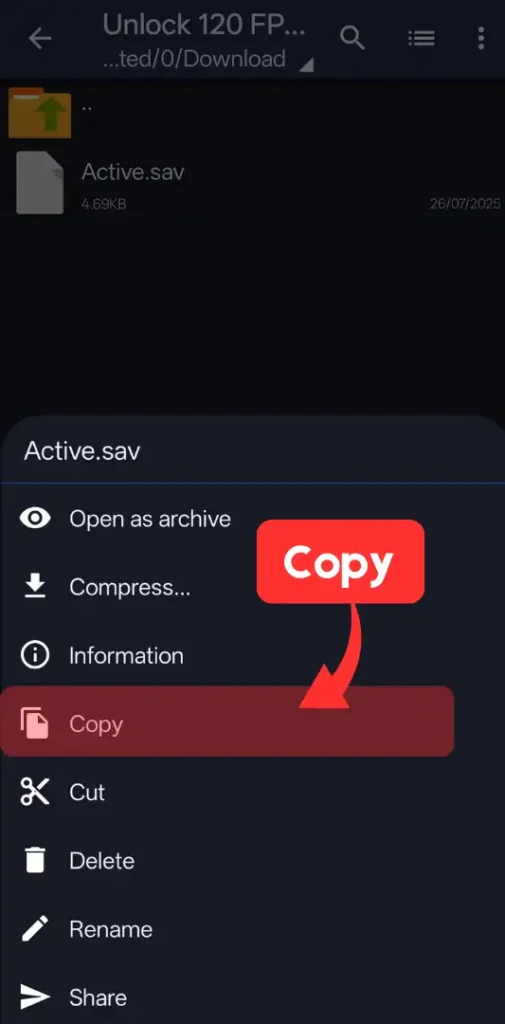
Step 4: Copy & Paste the File
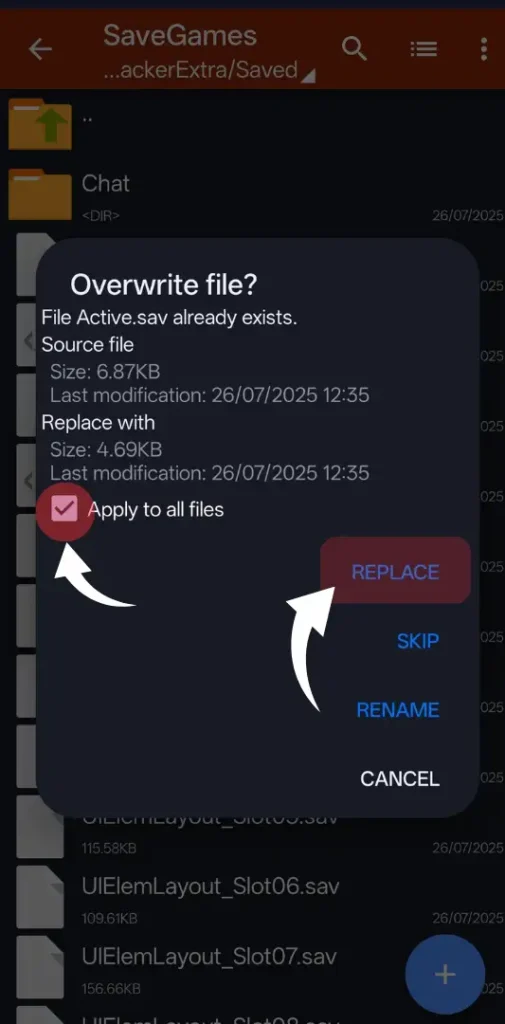
Now copy the extracted active.sav file to your game’s config folder based on your game version:
Replace any existing files if prompted.
Step 6: Launch the Game
Open BGMI or PUBG Mobile and enjoy buttery-smooth gameplay!
You won’t see the 120 FPS option in settings, but the game will still run at 120 FPS for smooth and fast performance.
Conclusion
on this Website, I have shared Step By Step Guide on How to Unlock 120 FPS Without Shizuku With You. I hope you have liked it Please do share it with your friends and follow our blog for more.
Follow Us On Our Telegram Channel to get the latest post updates daily.
Thank you!